Physical Address
304 North Cardinal St.
Dorchester Center, MA 02124
Physical Address
304 North Cardinal St.
Dorchester Center, MA 02124

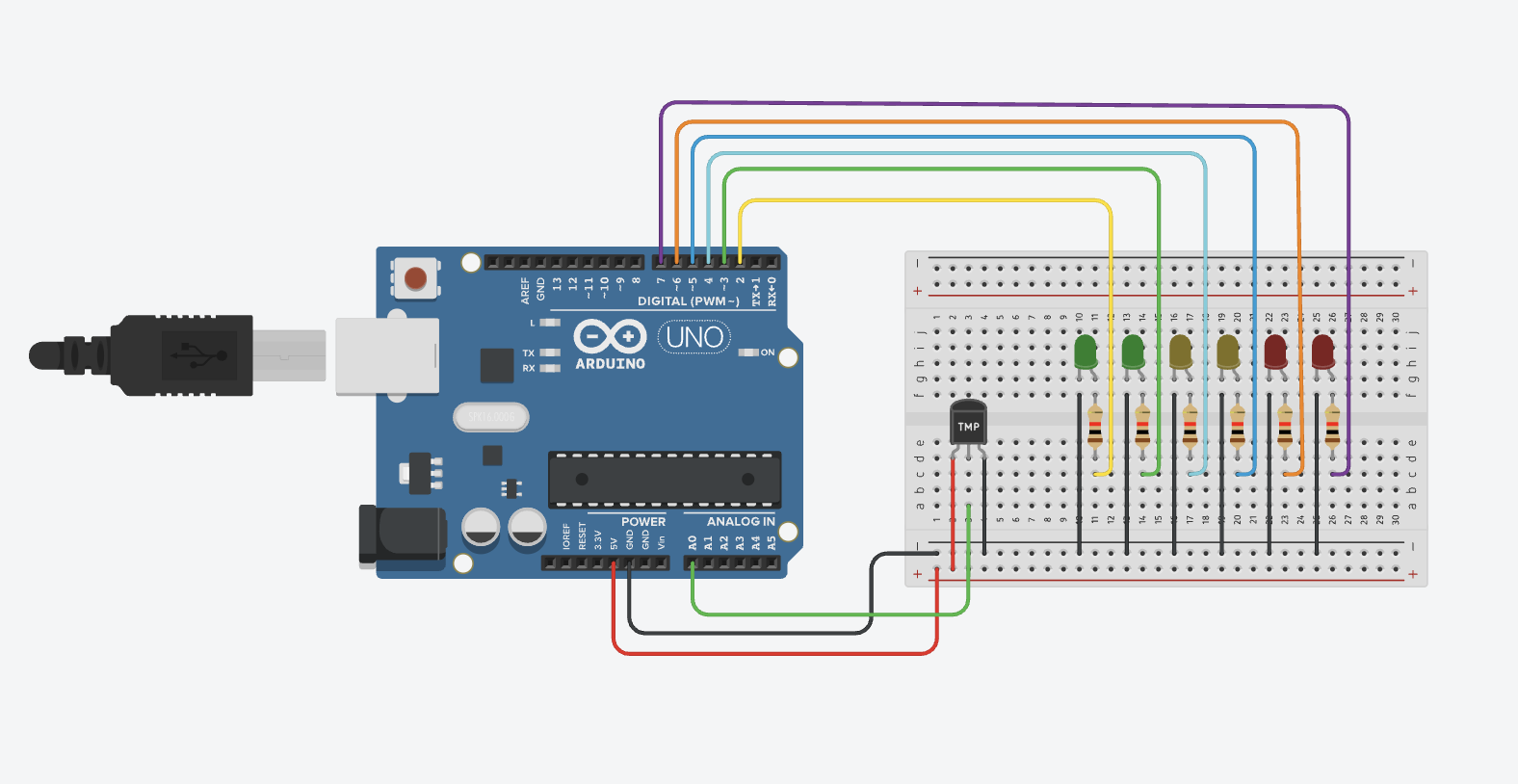
In this project, we’ll use a TMP36 temperature sensor and an Arduino to light up a row of LEDs based on the ambient temperature. As the temperature increases, more LEDs will light up from left to right, just like a temperature meter.
This post may contain affiliate links. If you purchase through these links, I may earn a small commission at no extra cost to you. It helps support this blog and keeps the projects coming—thanks for your support!
Facing the flat side of the TMP36 with the text facing you:
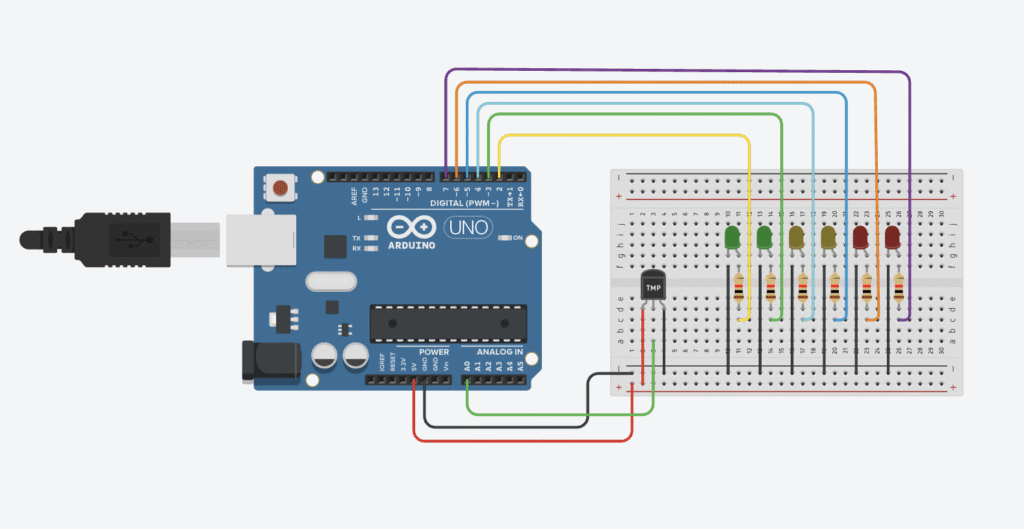
| TMP36 Pin | Connects to | Description |
|---|---|---|
| 1 (VCC) | 5V | Power supply |
| 2 (VOUT) | A0 | Analog output to Arduino |
| 3 (GND) | GND | Ground |
LEDs: Connect 6 LEDs to Arduino digital pins D2 through D7, each in series with a 220Ω resistor.
const int tempPin = A0;
const int ledPins[] = {2, 3, 4, 5, 6, 7};
const int ledCount = 6;

void setup() {
  for (int i = 0; i < ledCount; i++) {
    pinMode(ledPins[i], OUTPUT);
  }
}

void loop() {
  int sensorValue = analogRead(tempPin);
  float voltage = sensorValue * (5.0 / 1023.0); // Convert analog reading to voltage
  float temperatureC = (voltage - 0.5) * 100.0; // TMP36: 10mV per degree with 500mV offset

  // Map temperature range (20–40°C) to number of LEDs to turn on (0–6)
  int level = map(temperatureC, 20, 40, 0, ledCount);
  level = constrain(level, 0, ledCount);

  // Light up LEDs according to temperature level
  for (int i = 0; i < ledCount; i++) {
    digitalWrite(ledPins[i], i < level ? HIGH : LOW);
  }

  delay(300); // Short delay to stabilize readings
}
This standalone project turns an analog temperature sensor (TMP36) into a simple LED thermometer. It’s ideal for learning how to convert analog input into real-world feedback.
const int tempPin = A0;
const int ledPins[] = {2, 3, 4, 5, 6, 7};
const int ledCount = 6;

void setup() {
  for (int i = 0; i < ledCount; i++) {
    pinMode(ledPins[i], OUTPUT);
  }
}

void loop() {
  int sensorValue = analogRead(tempPin);
  float voltage = sensorValue * (5.0 / 1023.0); // Convert analog reading to voltage
  float temperatureC = (voltage - 0.5) * 100.0; // TMP36: 10mV per degree with 500mV offset

  int level = map(temperatureC, 20, 40, 0, ledCount);
  level = constrain(level, 0, ledCount);

  for (int i = 0; i < ledCount; i++) {
    digitalWrite(ledPins[i], i < level ? HIGH : LOW);
  }

  delay(300);
}
– The TMP36 sensor gives an analog voltage that corresponds to temperature.
– The formula (voltage - 0.5) * 100 converts that voltage to Celsius.
– The temperature is then mapped from 20°C–40°C into 0–6 LED levels.
– Based on the current temperature, a corresponding number of LEDs light up to create a bar-style indicator.
This project is beginner-friendly, highly visual, and easily extendable. You can add an OLED display, buzzers, or even WiFi integration later.
(voltage - 0.5) * 100.If you’re just getting started with Arduino, these beginner-friendly kits will help you learn faster and avoid the headache of missing parts. They all include essential components like LEDs, resistors, jumper wires, and an Arduino-compatible board.
💡 Tip: Choose a kit with a good variety of components so you can build multiple projects without buying extra parts later.