Physical Address
304 North Cardinal St.
Dorchester Center, MA 02124
Physical Address
304 North Cardinal St.
Dorchester Center, MA 02124

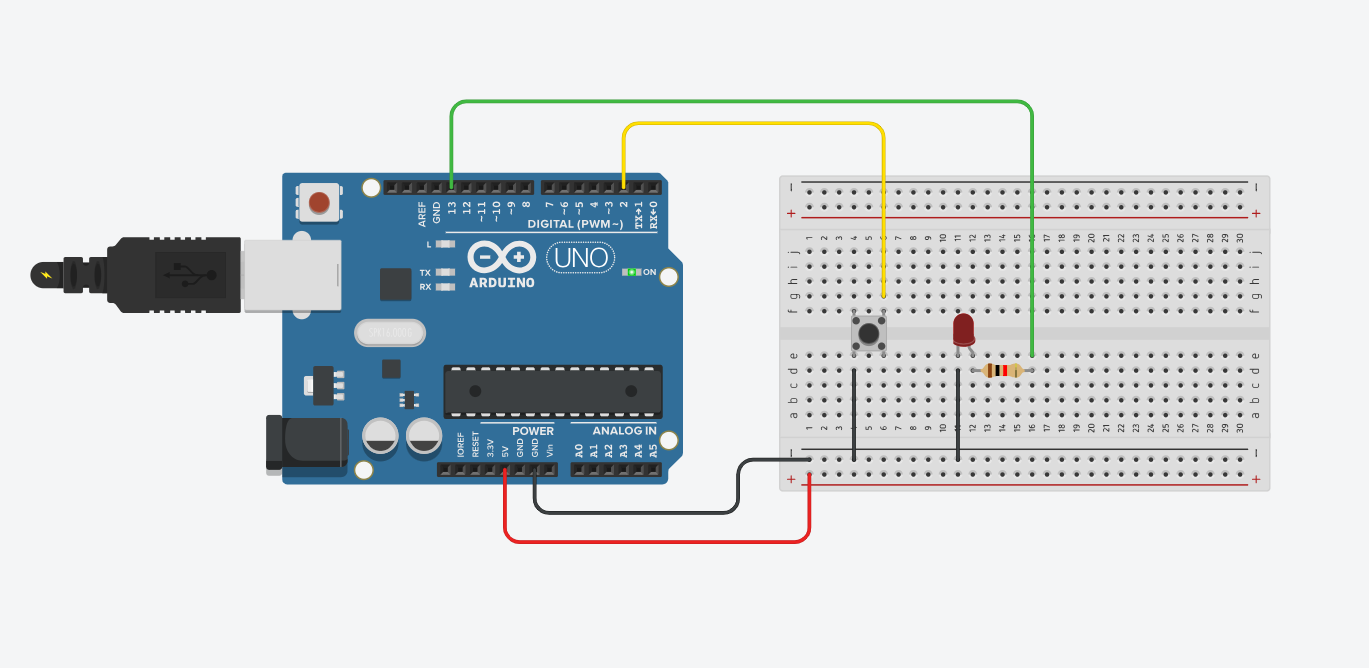
Controlling an LED with a pushbutton is one of the best starting points when learning Arduino. In this tutorial, you’ll learn how to wire a simple circuit and write basic code that lets you turn an LED on and off using a single button.
It’s simple, fast to build, and teaches you two key Arduino functions: digitalRead() and digitalWrite().
This post may contain affiliate links. If you purchase through these links, I may earn a small commission at no extra cost to you. It helps support this blog and keeps the projects coming—thanks for your support!
We connect a pushbutton to a digital pin, and use Arduino’s built-in INPUT_PULLUP feature. That way, we don’t need an external resistor — the pin reads HIGH when the button is not pressed, and LOW when it is.
When the button is pressed, the LED turns ON. When released, it turns OFF.
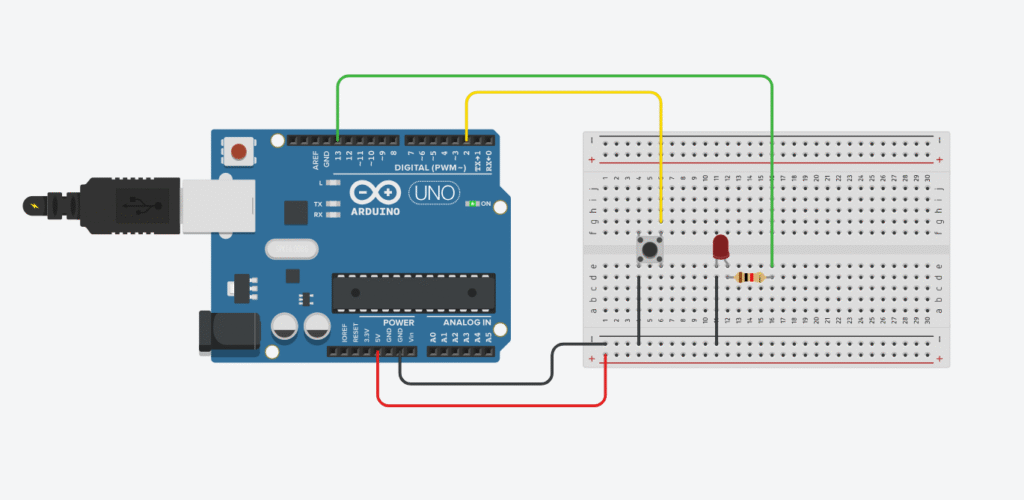
This logic is useful in many real-life electronics applications — like triggering an event when a door is opened, starting a timer, or turning on a device only when a physical button is pressed.
Wiring:
Note: Since we’re using INPUT_PULLUP, the logic is inverted (LOW = pressed).
You can also simulate this circuit using Tinkercad Circuits if you don’t have the hardware yet. It’s a great way to test your setup without soldering or real components.
const int ledPin = 13;
const int buttonPin = 2;

void setup() {
  pinMode(ledPin, OUTPUT);
  pinMode(buttonPin, INPUT_PULLUP); // internal pull-up enabled
}

void loop() {
  int buttonState = digitalRead(buttonPin);

  if (buttonState == LOW) {
    digitalWrite(ledPin, HIGH); // LED ON
  } else {
    digitalWrite(ledPin, LOW); // LED OFF
  }
}
Simple as that! This logic can be reused in countless future projects — controlling motors, triggering buzzers, starting sequences, and more.
💡 Tip: If you want the LED to turn ON when the button is not pressed, just flip the logic in the if statement.
Once you master reading buttons, the rest of Arduino becomes 10x more fun 🔥
Stay curious, and keep building!
If you’re just getting started with Arduino, these beginner-friendly kits will help you learn faster and avoid the headache of missing parts. They all include essential components like LEDs, resistors, jumper wires, and an Arduino-compatible board.
💡 Tip: Choose a kit with a good variety of components so you can build multiple projects without buying extra parts later.